
E-Ink tablets are getting a lot more interesting.
What used to be a fairly simple category built around reading and annotation is now turning into something much more useful for people who live inside meetings, notes, PDFs, recordings, and research materials all day.
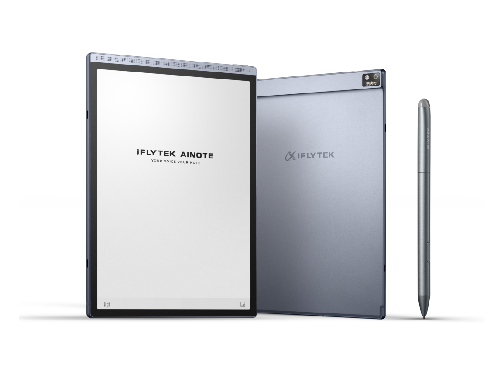
The iFLYTEK AINOTE Air 2 is a good example of where that category is headed. It is a compact AI-powered paper tablet with an 8.2-inch E-Ink display, built-in front light, document scanning camera, speakers, handwriting support, and AI tools designed to make notes more searchable and useful after they are created.
That last part is key.
Most people do not need another place to write something down. They already have notebooks, phone apps, laptop documents, voice memos, emails, and screenshots. The bigger problem is keeping all of that information organised in a way that makes sense later.
The AINOTE Air 2 is designed for the moment after the note is taken.
It can help transcribe conversations, generate summaries, recognise handwriting, and connect written notes with recorded audio. So instead of ending a meeting with a page of half-useful scribbles and a recording nobody wants to replay, users can build a more complete record of what happened.
That makes the device especially useful for students, journalists, consultants, writers, researchers, and professionals who move between meetings and projects throughout the week.
A Compact Device for Daily Work
The Air 2’s biggest advantage is its size.
At 8.2 inches, it is small enough to carry easily but still large enough to serve as a real writing and reading device. That puts it in a useful middle ground for people who want something more capable than a pocket notebook but less cumbersome than carrying a laptop into every situation.

The built-in front light makes the device practical in more environments, whether someone is reading in bed, reviewing notes on a flight, or working in a dim café. The integrated speaker supports audio playback, while the built-in camera allows for document scanning without needing to switch to a phone.
It is easy to imagine using the Air 2 across a normal day: reading a report in the morning, taking notes during a call, scanning a printed document, recording a lecture, and reviewing AI-generated summaries later.
That is where the device starts to feel less like a gadget and more like a workflow tool.
Recent US Deal Snapshot
For readers already considering a dedicated AI paper tablet, the iFLYTEK AINOTE Air 2 was recently promoted in the US with a limited-time discount through July 6. Check the official store for the latest availability and price.
iFLYTEK AINOTE Air 2
Regular Price: $499
Recent Deal Price: $399
Recent Discount: 20% Off
Buy from the official iFLYTEK Store: https://iflytek.biz/4vV87jS
That deal brought the Air 2 into a more accessible price range for users who want AI note-taking, E-Ink reading, transcription, audio-linked notes, and document scanning in one compact device.
Why the AI Layer Matters
AI on a note-taking device sounds flashy, but the most useful features here are practical.
Meeting summaries can help reduce the time spent rewriting notes after a call. Transcription can preserve details that were missed in the moment. Handwriting recognition can make written notes easier to search later. Audio-linked notes can help users return to the exact part of a lecture, interview, or meeting where an idea came from.
These are not abstract AI features. They solve real note-taking problems.
Anyone who has ever written “follow up on this” without remembering what “this” referred to knows the issue.
The AINOTE Air 2 gives users a way to capture information more naturally and still benefit from digital organisation. That balance is what makes AI-powered E-Ink tablets such an interesting category right now.
They are not trying to be entertainment devices. They are not trying to replace smartphones. They are focused on reading, writing, listening, scanning, and organising.
For people who want a quieter, more intentional way to manage information, that focus may be exactly the point.




Feedback Junction
Where Thoughts and Opinions Converge